Usage Instructions for Futures Bonus, Position Airdrop, and Vouchers
1. Futures Bonus Usage Instructions
1.1 Futures Bonus Rules
1) Futures Bonuses can only be used for Futures trading, including regular trading, copy trading, and grid trading. Any profits earned using the bonus can be withdrawn, while the Futures Bonus itself cannot be withdrawn. Any unused bonus will be automatically revoked once it expires.
2) Futures Bonuses can be used to cover trading fees, funding fees, and realized losses. When the USDT balance in the account is insufficient, Futures Bonuses can also be used as margin for trading.
Note: Futures Bonuses are prioritized for deductions such as trading fees, funding fees, and realized losses. Therefore, when an account contains both USDT and Futures Bonuses, USDT will be used first as margin when opening a position. This helps prevent Futures Bonuses from being automatically deducted and reducing the available margin, which could otherwise increase the risk of liquidation.
3) Futures Bonus deductions can be viewed in your transaction history. Trading fees, realized losses, and funding fees may be combined and displayed as a single bonus deduction record.
Example 1: If your account has 5 USDT in Futures Bonus and you incur a 2.5 USDT loss plus a 0.03 USDT closing fee, your transaction history will show a Futures Bonus deduction of 2.53 USDT.
Example 2: If your account has 2 USDT in Futures Bonus and you incur a 2.5 USDT loss plus a 0.03 USDT closing fee, your transaction history will show a Futures Bonus deduction of –2 USDT.
4) If you withdraw any assets from your Futures Wallet before the Futures Bonus has been fully used, all remaining Futures Bonus will be forfeited immediately.
5) Trading fees covered by Futures Bonuses are not eligible for commission rebates.
6)Futures Bonuses can only be used for USDT-M Futures and are not supported for USDC-M or Coin-M Futures.
1.2 How to View Your Futures Bonus
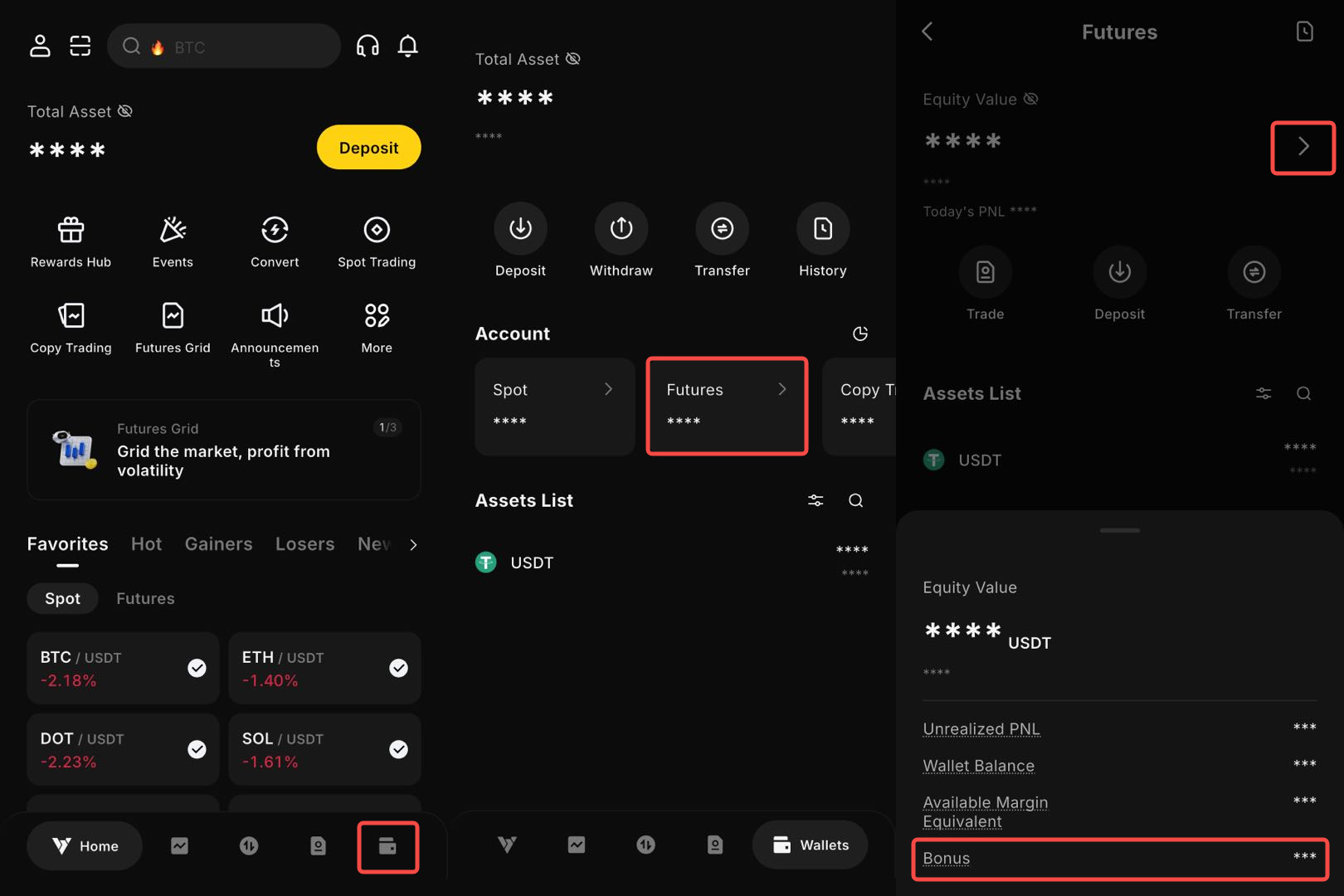
Check your Futures Bonus balance: Your Futures Bonus will be credited directly to your Futures Wallet.
Open and log in to the BYDFi App. Go to Wallets → Futures, then tap Futures Balance to view your Futures Bonus balance.
Futures Bonus Usage Details:
1. Open and log in to the BYDFi App.
2. Go to Futures trading page.
3. Tap the Order History icon .
4.Select Capital Flow. Under Filters, choose Bonus, then tap Confirm to view your Futures Bonus usage details.
2. Position Airdrop Usage Instructions
2.1 How to Claim a Position Airdrop
1) Specially invited users can claim rewards by visiting the designated event landing page or tapping the relevant in-App pop-up.
2) Users can also participate in eligible events to claim Position Airdrop rewards.
Note: For certain events, user eligibility is evaluated on a daily basis according to the applicable criteria. If you do not meet the eligibility requirements on the day you attempt to claim the reward, the Position Airdrop may not be granted.
2.2 How to Participate in the Position Airdrop Event
Once you successfully claim a Position Airdrop, you will receive an email notification. The leverage, position value, and trading pair are not fixed and may vary. Please refer to the information provided in the email for the specific details of your Position Airdrop. For most Position Airdrops, the trading direction is assigned randomly.
2.3 How to View Your Claimed Position
After successfully claiming the Position Airdrop, you can go directly to the Futures trading page to view the corresponding position.
2.4 How to Use Your Claimed Airdrop Position
You can add to your Position Airdrop to increase potential profits, set take-profit and stop-loss orders, or fully close the position. After the position is closed, any profits generated from the Position Airdrop can be withdrawn. However, the remaining margin will be automatically revoked and cannot be withdrawn or reused.
If the airdropped position incurs a loss and you have not added any additional margin, your maximum loss will be limited to the airdropped funds. Your other assets will not be affected.
3. Fee Voucher Usage Instructions
3.1 Fee Voucher Rules
1) Fee Vouchers can only be used to offset Futures trading fees. They cannot be used as margin and cannot be withdrawn. Any expired Fee Vouchers will be automatically reclaimed.
2) Fee Vouchers are automatically applied when eligible trading fees are incurred. No manual selection is required.
3) Fee Vouchers have the highest priority when trading fees are deducted.
4) A Fee Voucher can only be used when its available value is sufficient to cover the entire trading fee. Partial deduction of a trading fee using a Fee Voucher is not supported.
5) Trading fees offset using Fee Vouchers are not eligible for commission rebates.
6) Fee Vouchers are not supported for USDC-M or Coin-M Futures.